Mey IVY
Sixteen-voice Polysynth
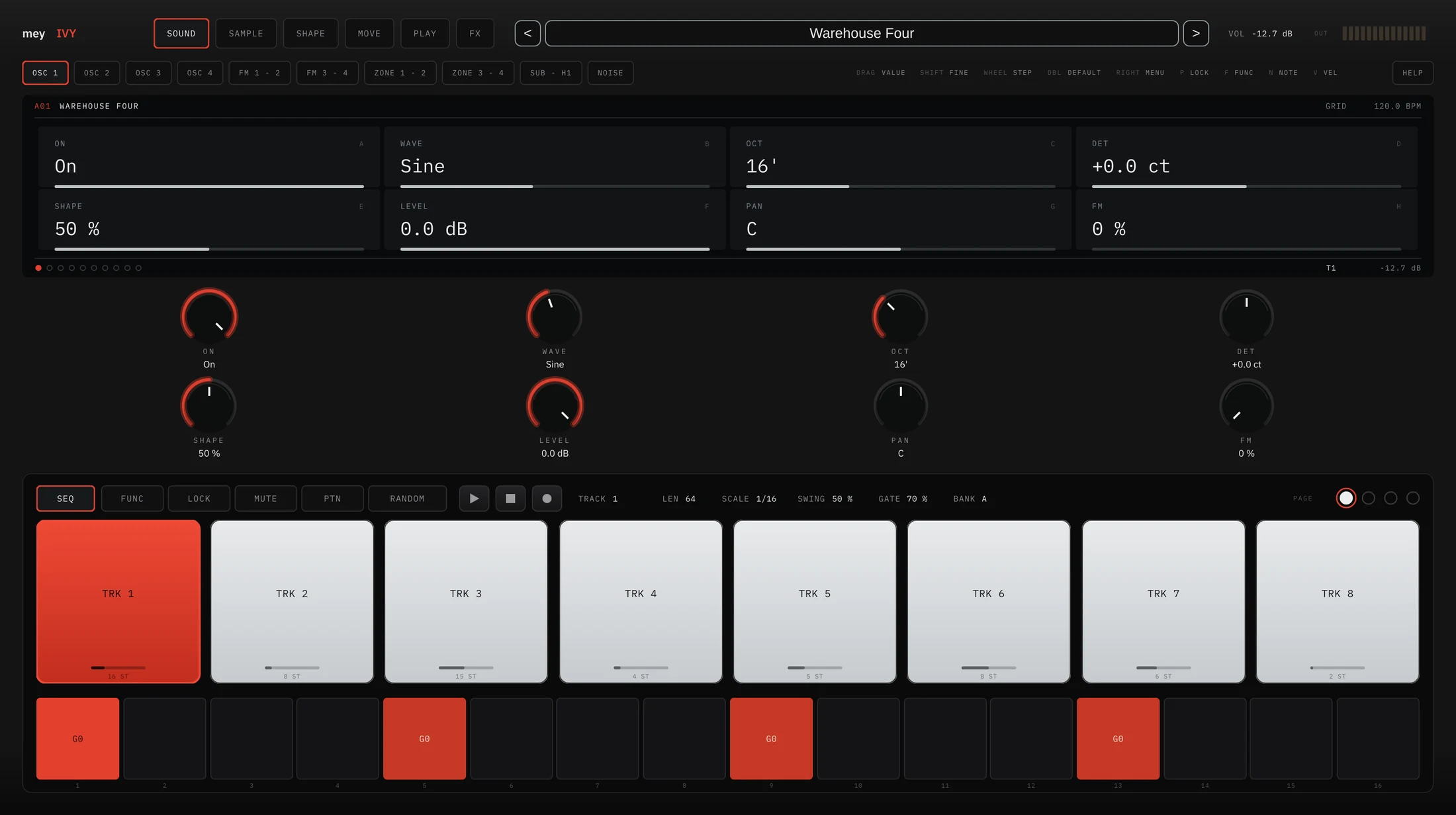
A synthesiser and a sequencer that are one instrument, not two bolted together. Eight tracks, each with a complete sound of its own: four oscillators, a sub with a derived first harmonic, noise, a sampler, two filters, three envelopes, two LFOs and a twelve-slot matrix. Every step of every track can carry four notes, a velocity, a condition, a nudge in time, a roll, and up to forty-eight parameter locks. Two hundred and thirty-eight factory sounds, and a manual inside the plug-in.
Free to use. Not free to build.
Every plug-in here starts as a research problem before it's a product: working out how a divide-down oscillator actually makes its grain, or how a step sequencer has to behave before it feels like an instrument rather than a grid. That takes real computation, plugin-framework and code-signing licences, and increasingly the AI-assisted compute that lets one person work through that much DSP and testing without a studio behind them. None of that is charged to you. If Mey IVY has earned a place in your sessions, a donation helps keep the next one coming. It's entirely optional and changes nothing about what you already have.
One window. Eight tracks. Sixteen voices.
Mey IVY is a sixteen-voice polysynth with an eight-track sequencer built into the same panel. The two are not separate features: a track owns a complete sound, so eight tracks are eight instruments sharing one set of voices, one reverb and one EQ, the way eight channels share a desk. Load a kit and a kick, a clap, a hat, a bass and a lead arrive already playing against each other.
The panel has one screen with a fixed shape. Eight cells, four across and two down, lettered A to H, with the same eight controls as knobs underneath. Nothing moves when you change page, so you always look in the same place for the same thing. Every value answers to the same five gestures: drag, shift-drag for fine, wheel for one step, double-click for the default, right-click for a menu.
Four oscillators, two syncable pairs.
Four main oscillators in two pairs, the second of each able to hard-sync to the first. Eight waveforms each: saw, square, triangle and sine, then four wavetables. On the analogue shapes SHAPE is the pulse width; on the wavetables it is the frame you read.
The sawtooth is not a mathematical ramp. It is modelled the way a divide-down oscillator actually builds one: counters into a binary-weighted resistor ladder, so the wave is a staircase of 256 steps. The residual between those stairs and the ideal ramp is what puts the familiar grain on low notes. Above the audio band that residual is left out, because it would be inaudible.
Each oscillator also takes phase modulation from a source you choose: its pair partner, any of the four including itself, the sub, or the noise. Choosing itself is feedback. RATIO multiplies the modulator, with the integers for harmonic spectra and the half-integer ratios for the classic inharmonic metal. Underneath sits a sub with a square or sine one or two octaves down, its derived first harmonic, and a noise source with its own level and pan.
One patch can be a whole kit.
Every oscillator answers only to the stretch of keyboard you give it, with a fade at either end. A kick in the bottom octave, a hat at the top, nothing in between, all in one sound. The shipped zone is the whole keyboard with no fade, so a patch that never touches it plays as it always did.
A sample is a source like any other.
The sampler arrives before the filters with its own level and pan, and everything downstream treats it exactly as it treats an oscillator. START sets where playback begins, BW takes the bandwidth down for the grain of an older machine, and KEY decides how far the pitch follows the keyboard.
KEY MAP is how a kit is built by hand: one file for each stretch of the keyboard, each with its own root, gain and pan, and ZONE VEL adds a velocity range and a tuning per zone, so a soft hit and a hard hit can be two different files. The WAVE page draws the file and holds the root note, the loop and its crossfade, and the slices.
Two filters, a blend, and drive inside the loop.
Two filters, each with four modes: a twenty-four decibel low pass, a twelve and a six decibel band pass, and a twelve decibel high pass. BLEND mixes them and ROUTE decides whether they sit side by side or one after the other. DRIVE is inside the filter, not after it, which is what makes a resonant low pass bark rather than whistle, and it is where a hard kick gets its edge. The envelope amount is signed, so the filter envelope can close a filter as well as open it.
Three four-stage envelopes, one millisecond to ten seconds. The filter and amp envelopes share a page and are drawn one above the other, so you can see the two shapes against each other while you set them. The third has no wiring of its own: it exists to be a source in the matrix.
Two LFOs, twelve free slots, forty-seven destinations.
Each LFO runs free in hertz or locked to the host in divisions from a thirty-second to sixteen bars; LFO 1 also has a delay so it can fade in after the note rather than arrive with it. The matrix is twelve slots, two to a page, each a source, a destination and an amount.
Ten sources: both LFOs, the filter, amp and third envelopes, velocity, aftertouch, the mod wheel, key, and a random value per note. Forty-seven destinations, and unusually they include the effects: the reverb's decay, level, size and modulation, the delay's time, feedback and mix, and the EQ. A slow LFO into reverb size is a room that breathes.
Eight tracks, a hundred and twenty-eight steps each.
Every track has its own steps, its own length and its own resolution, shown sixteen at a time across up to eight pages. Because each track sets its own length, tracks of sixteen and twelve and seven run against each other and only meet again after a long time. That is polymeter, and it costs nothing here: set the lengths.
Click an empty step and a trig appears; click it again and it goes. Drag across the row and it fills every step you pass but never clears one, so a slip of the hand cannot undo your work. A new trig takes the last note you played in, which is how a drum part gets written without typing a pitch. Hold N over a trig and drag to set its note, V for its velocity, and while either key is down the row takes no other mouse input, so one press is never two edits.
The record key walks three modes. GRID is the default, where you place trigs by hand whether or not it is running. LIVE writes what you play onto the nearest step while the pattern keeps going, so a part builds in layers. STEP walks the pattern a step at a time and a note fills the lit step and moves on.
A value that belongs to one step.
Tap P, click a trig, and turn anything on the panel. That value now belongs to that step alone. A voice started by a locked step takes its own copy of the whole parameter set, so the lock lives exactly as long as the note and the next note is unaffected. Each step carries up to forty-eight of them, and a step with locks but no note applies them to whatever is already sounding without starting anything.
It is the difference between a pattern that repeats and a pattern that moves, and it is the reason the sequencer had to be inside the synth rather than in front of it.
Sixteen steps that stop sounding like sixteen steps.
Three things per step decide whether it plays, where it lands, and how many times it fires.
| Conditions | a straight chance in percent, and play on the Ath of every B rounds, and both have to pass |
| Micro timing | early or late by up to six twenty-fourths of a step, fine enough to feel and coarse enough to reproduce |
| Retrig | eight rates from a whole step down to a sixteenth of one, with a hit count and a decay in decibels per hit |
A negative retrig decay is a roll that fades, a positive one is a roll that builds, and each hit ends one sample before the next begins so the fastest rate is still clean. RANDOM writes a whole pattern in one press: notes, velocities, lengths, accents, slides, conditions, micro timing, retrigs and locks. It is not white noise, because each track's place in the pattern gives it a job, so the first track is the pulse and the last ones are sparse and allowed to be strange. Hold F and press RANDOM to re-roll only the armed track.
Switch a pattern without landing mid-bar.
A hundred and twenty-eight patterns in eight banks of sixteen, named A01 to H16. A pattern holds all eight tracks and the kit that plays them. Press PTN and the trig row becomes the sixteen slots of the current bank: click one and it switches at once if nothing is playing, or when the current pattern comes round if it is. Press MUTE and the same row becomes eight track switches, which take effect immediately, because that is what a mute is for. Between the two, the arrangement is played rather than drawn.
Two hundred and thirty-eight to start from.
The factory bank runs from pads and basses through techno, house, acid, electro and FM to drums and percussion, in nineteen categories. Many are not single sounds but kits, with a sound on every track and a pattern of at least sixty-four steps already written. Press TO TRK in the browser and the next name you click goes to the armed track alone, so a kit is built by clicking through the bank and listening; SAVE SOUND puts the armed track's sound aside to use on any other.
After the voices come the shared effects: a chorus; an EQ with a high pass, low and high shelves, a sweepable mid and a drive; a reverb with four rooms, a modulated tail and separately tuned low and high decay; and a dual delay, mono or stereo, free or synced, with its own tone and ping pong. One page sets the balance of the whole section.
| Polyphony | Sixteen voices, shared across all eight tracks |
| Oscillators | Four in two syncable pairs · eight waveforms each |
| Sub | Square or sine, one or two octaves down, with a derived first harmonic |
| Sampler | Key and velocity zones · slices · looping with crossfade · bandwidth |
| Filters | Two · LP 24, BP 12, BP 6, HP 12 · parallel or serial · per-filter drive |
| Envelopes | Three, four-stage, 1 ms to 10 s |
| Modulation | Two LFOs · twelve matrix slots · ten sources · forty-seven destinations |
| Sequencer | Eight tracks · up to 128 steps each · 1/8, 1/16 or 1/32 per track |
| Per step | Four notes · velocity · length · slide · accent · up to 48 parameter locks |
| Conditions | Chance in percent · every A of B rounds · micro timing in 24ths |
| Patterns | 128 in eight banks of sixteen, switched on the turn |
| Effects | Chorus · EQ with drive · reverb · dual delay, all modulatable |
| Presets | 238 factory sounds in nineteen categories |
| Version | 0.15.0 · free |
A signed installer, no choices to make.
On macOS, download the installer and double-click it. It places the VST3 in ~/Library/Audio/Plug-Ins/VST3, the Audio Unit in ~/Library/Audio/Plug-Ins/Components and the standalone in Applications. If macOS shows a Gatekeeper warning, right-click the installer and choose Open once, then confirm. That is only needed the first time. On Windows, run the installer: it puts the VST3 in C:\Program Files\Common Files\VST3 and the standalone in Program Files with a Start menu entry. Restart your DAW or rescan plug-ins, load a kit from the TECHNO or DRUMS category, and press play.
The whole manual is inside the plug-in: press HELP at the right of the chip row. There is nothing to look up and nothing to keep in a folder. The same manual is on this site and as a PDF, written from one source, so the three never disagree.
More is coming.
This is v0.15.0, the first public build of Mey IVY. Feedback is welcome at info@wearemey.com.
Know someone who'd use this?
Mey IVY is free. Sharing it with someone who mixes or masters is the fastest way to help.