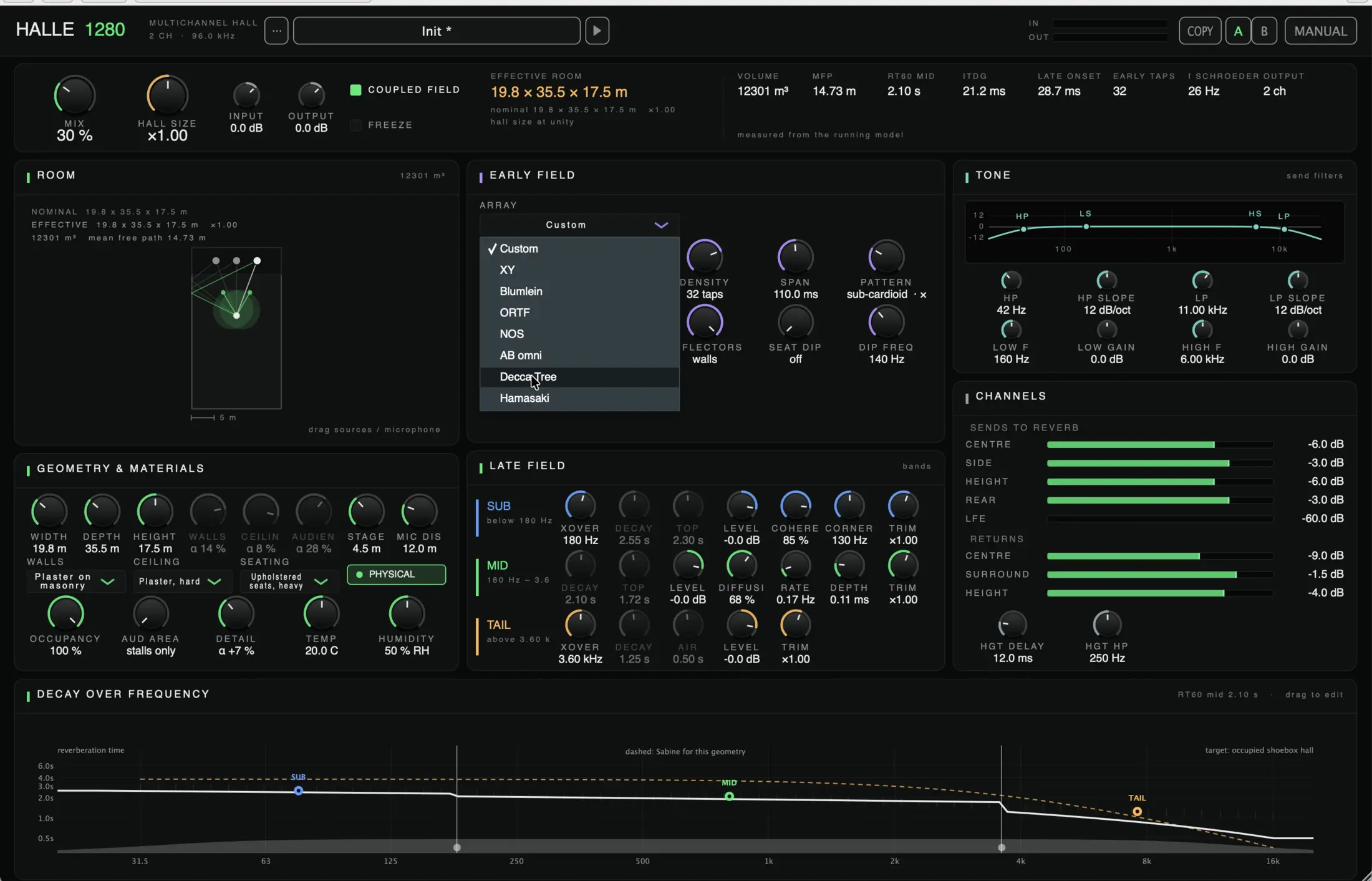
A hall reverb built from a room, not a stored impulse. Its dimensions, walls, ceiling, audience and air make the sound, so every control you move is a physical one.
“The Halle 1280 is an impressive acoustic space generator. It delivers a powerful, detailed, and natural sound that brings out the true character of every recording. As a sound designer, I appreciate the combination of accuracy, depth, and realism.”
 Bastiaan BarthSolidtrax
Get the highlights.
What it is
A room, modelled.
Width, depth, height, wall and ceiling material, occupancy, temperature and humidity feed a running model of the room. It works out the volume, mean free path, RT60, initial time delay gap, late onset and Schroeder frequency in real time, and the numbers above the panel change as you move the controls.
COUPLED FIELD ties the early and late fields to the same room. FREEZE holds the tail for pads and sustained textures, and HALL SIZE scales the whole room up or down.
Room and materials
Geometry and surfaces, not a size preset.
WIDTH, DEPTH and HEIGHT in metres, with source and microphones you drag around the room diagram. WALLS, CEILING and AUDIEN each get their own material, from plaster on masonry to heavy upholstered seating.
A full hall absorbs differently from an empty one, and a warm, dry room gives a different tail from a cold, damp one. OCCUPANCY, TEMP and HUMIDITY put that into the model.
Early field
Real recording-technique arrays.
ARRAY picks the microphone technique behind the early reflections: XY, Blumlein, ORTF, NOS, AB omni, Decca Tree, Hamasaki, or your own. DENSITY sets the number of reflections, SPAN their time window, and SEAT DIP the comb filtering an audience brings at grazing angles.
Late field
Sub, mid and tail, decaying apart.
A room rarely decays at one rate across the spectrum, and HALLE 1280 doesn’t force it to. Two crossovers split the late field into SUB, MID and TAIL, each with its own decay, level and character.
A graph plots all three against a Sabine reference from the current room, so you see how far your tuning departs from what the geometry predicts.
Tone
A send filter, not a channel EQ.
TONE shapes what feeds the reverb, not the dry path: a high-pass and a low-pass with adjustable slope, and two shelves inside them. The fastest way to keep a reverb out of a low end it was never meant to carry.
Channels and routing
Sends and returns for immersive formats.
Separate sends for centre, side, height, rear and LFE, and returns per group for centre, surround and height. HGT DELAY and HGT HP set the height return a little behind the main field and take out its low end, so overhead reflections read as overhead.
Presets, A/B and metering
Compare freely, name your own.
A/B holds two full states to switch between, and COPY duplicates the current one. IN and OUT meters run at the top of the panel, and the presets are named for room type and treatment, never for a real venue. MANUAL opens the documentation from inside the plug-in.
Tech specs
- Formats
- VST3, Audio Unit
- Platforms
- macOS (Apple silicon) · Windows
- Channels
- Stereo through immersive height-channel busses
- Microphone arrays
- XY · Blumlein · ORTF · NOS · AB omni · Decca Tree · Hamasaki · Custom
- Late field
- SUB below 180 Hz: decay and top time, coherence, corner, trim
MID 180 Hz – 3.6 kHz: decay and top time, diffusion, modulation rate and depth, trim
TAIL above 3.6 kHz: decay time, air damping, level, trim - Room model
- Geometry, materials, occupancy, temperature, humidity
- Readouts
- Volume · mean free path · RT60 · ITDG · late onset · Schroeder frequency
- Sample rate
- Tested at 96 kHz
- Metering
- Continuous in/out, A/B compare, copy
- Version
- 1.0.0, free, no account, no licence key
Questions
How do I install it?
On macOS, double-click the signed installer; it puts the VST3 and the Audio Unit in your user plug-in folders. If macOS says it cannot check the installer, open System Settings, Privacy & Security, and click Open Anyway (on macOS 12 and earlier: System Preferences, Security & Privacy). On Windows, unzip the download and copy the VST3 into C:\Program Files\Common Files\VST3. Then rescan your plug-ins and insert HALLE 1280 on a return bus.
Is this the finished version?
This is 1.0.0, the first public build, and more is coming. Feedback is welcome at info@wearemey.com.
Free to use. Not free to build.
If HALLE 1280 has earned a place in your sessions, a coffee helps keep the next one coming. Entirely optional.